Dumping Tears of the Kingdom
Prerequisites
- Tears of the Kingdom base game and update (1.1.0 or later) either installed digitally or as a cartridge.
- Lockpick_RCM (For dumping your keys)
- nxdumptool
Preparation
1. SD Card Setup
- Install Lockpick by copying
Lockpick_RCM.binto the folder/bootloader/payloadson your SD card and overwrite it if already existing (if you already had Lockpick, you still need to download the latest version and replace it). - Install nxdumptool by copying
nxdt_rw_poc.nroto the/switchfolder in the SD card.
2. Determine if dumping is actually necessary
To determine where the base game and update data are installed, refer to Data Management > Manage Software > Tears of the Kingdom in the Switch's settings.
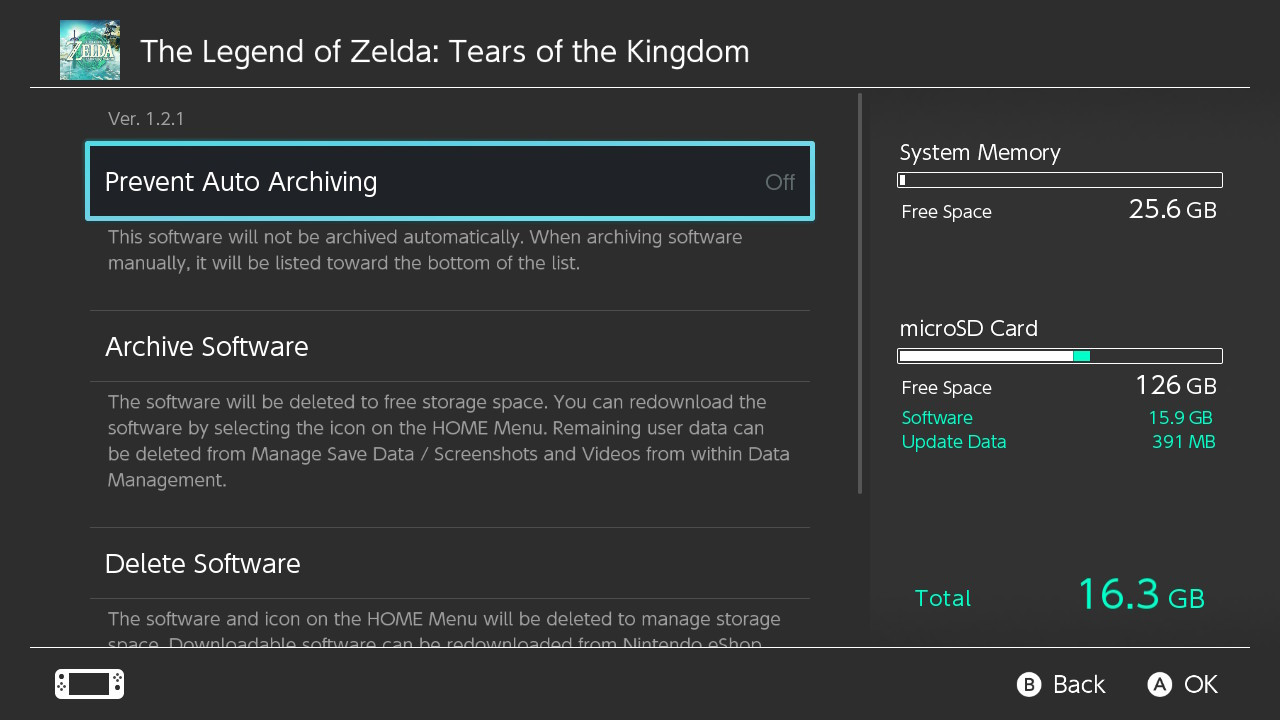
If both Software and Update Data are listed under microSD Card, you do not need to dump the game, and all that is required is dumping the Switch's keys.
If you have the base game or update on system memory, it is recommended to transfer it to the SD card instead of dumping, otherwise you will end up with the game stored both on system memory and the SD card.
Otherwise, only parts not installed on the microSD Card need to be dumped. If your game is a cartridge, then dumping is mandatory to get through the TKMM-NX setup.
3. Dumping Keys
To dump the Switch's keys, open the Payloads section in Hekate and launch Lockpick_RCM.bin, then select either Dump from SysNAND if you play the game on SysMMC, or Dump from EmuNAND if you play the game on EmuMMC. (Use the power button to select and volume up/down to navigate.)
If you already dumped your keys prior to following this tutorial, you still need to redump them using the latest version of Lockpick.
If your Switch firmware receives a major update in the future (e.g. going from 21.x.x to 22.x.x), you will also need to redownload the newest version of Lockpick and redump the keys again.
Note
It is not necessary to do this step again if you already did when following the main TKMM-NX tutorial.
4. Dumping Tears of the Kingdom
This step is unnecessary if you moved the game from system memory to the SD card. It is still necessary for the Base Game if your copy is a physical cartridge.
Begin by running nxdumptool (nxdt_rw_poc) from the Homebrew Launcher.
Base Game
- If the base game is a cartridge, ensure the cartridge is inserted into the console, then navigate to
gamecard menu>dump gamecard image (xci). Selectyeson thetrim dumpoption, then navigate tostart xci dumpand press A. - If the base game is installed to system memory, open the
user titles menu, select Tears of the Kingdom, navigate tonsp dump options>dump base applicationand finally selectstart nsp dump.
Update
- If the update is installed to system memory, open the
user titles menu, select Tears of the Kingdom, navigate tonsp dump options>dump updateand finally selectstart nsp dump.
Join the nxdumptool Discord server for assistance on how to dump if needed.
Tip
TKMM can handle split files; combining them after dumping is not required.